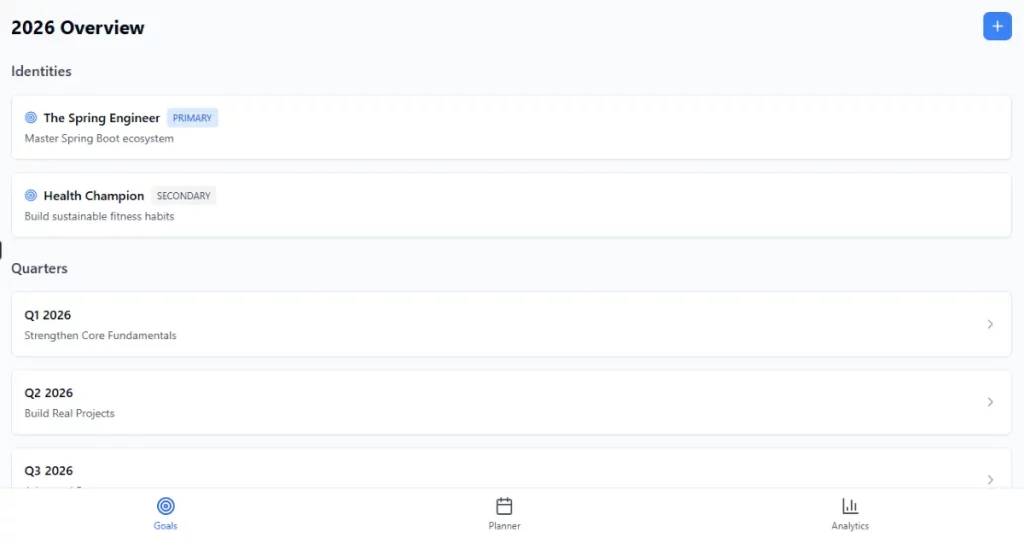
A goal tracker should help you connect long-term direction to what you actually do day to day. Not just list tasks, not just track habits, but make it clear why today’s actions matter in the context of a bigger plan. That’s the problem I’m trying to solve with this project.
Introduction
Most goal trackers fail not because they’re missing features, but because they don’t connect daily actions to long-term direction.
In my previous post, I focused on the planning side of goal setting: identities, annual direction, and quarterly focus. This post is the follow-through. I’m going to walk through how I’m designing and building a goal tracker web app to execute that plan in a way that feels realistic, sustainable, and measurable.
This isn’t a generic todo app. It’s a personal execution system designed to turn intent into consistent action.
If you want more background on why this system is designed this way, I broke down the underlying principles in a separate post here: Strategic Planning for New Year Goals: A Practical Approach for 2026
TL;DR
I’m building a personal goal tracker that connects identity, quarterly goals, weekly planning, and daily execution. It’s mobile-first, intentionally scoped, and focused on consistency rather than perfection. Because I want to start using it in January 2026, I’m building it quickly and pragmatically, using AI tools like Claude and Cursor to speed up implementation without over-engineering.
A quick note on speed and tooling
One important constraint shapes this entire project: I want to start using this app in January 2026.
That means the goal isn’t to build the most elegant or extensible system possible. The goal is to build something solid, understandable, and usable fast enough to support real planning and execution.
For that reason, I’m intentionally leaning on AI tools:
- Claude (web) for design discussions, edge cases, and reasoning through product decisions
- Cursor as an AI-assisted editor to speed up implementation, refactors, and boilerplate-heavy work
This isn’t about outsourcing thinking. It’s about reducing time spent on mechanical work so I can focus on design decisions that actually matter. If something is good enough to support real usage, that’s a win for this phase.
What this goal tracker is (and isn’t)
What it is
- A personal, mobile-first goal tracker
- Built for one user
- Focused on consistency and direction, not task overload
- Connects identity → quarterly goals → weekly planning → daily execution
- Includes analytics meant for reflection, not pressure
What it isn’t
- A team collaboration tool
- A habit app built around streaks
- A notification-heavy productivity system
- A public or social dashboard
The scope is intentionally small. I’m optimizing for usefulness, not coverage.
The core idea behind this goal tracker
Most tools lean too far in one direction.
Some focus on high-level goals that feel inspiring but never show up in daily behavior. Others turn into endless task lists with no real sense of direction.
This goal tracker is meant to sit in the middle.
The execution loop
- Annual identities define direction
- Quarterly goals define focus
- Weekly planning blocks define intent
- Daily execution creates data
- Analytics close the feedback loop
Every daily action should map back to a larger goal or identity. If it doesn’t, it’s worth questioning why it exists.
Core principles guiding the design
These principles shape almost every decision in the system.
Top-down clarity
Everything flows in one direction:
Annual → Quarterly → Weekly → Daily
There shouldn’t be any orphaned tasks that exist without context.
Local decisions, global context
When I mark something as done or skipped, I want to know:
- Which goal this supports
- Which identity it reinforces
That context matters more than the checkbox itself.
Low-friction execution
Planning and scheduling should be quick. If interacting with the system feels heavy, the system has already failed.
Objective feedback
The goal tracker focuses on consistency rather than perfection. Skipped work is still useful data and should be treated that way.
Structured but flexible
The system supports recurring habits and intentional planning sessions without locking everything into rigid rules.
Who this app is for
Primary user
- A single, technically inclined user
- Uses the app daily or weekly
- Focused on long-term improvement, not daily productivity metrics
Out of scope for v1
- Multi-user collaboration
- Shared goals
- Public dashboards
This is a personal tool, not a platform.
Functional design overview
Authentication
Users can:
- Sign up
- Sign in
- Sign out
All data is user-scoped. There’s no anonymous usage.
Identity management (annual)
Identities act as anchors rather than tasks.
Each identity includes:
- Name
- Type (Primary or Secondary)
- Description
These represent who I’m trying to become over the course of a year, not what I’m trying to complete in a week.
Quarterly planning
Each year is split into quarters. Each quarter includes:
- A theme
- Primary goals
- Secondary goals
Goals can optionally link back to an identity to preserve context.
Goal guides (a key detail)
Each goal includes guides or rules.
These are unordered bullet points that explain:
- How the goal should be executed
- What “done” actually means
This helps avoid goals that sound clear on paper but become vague once execution starts.
Planning blocks instead of tasks
This is one of the most important design decisions.
Instead of tracking individual tasks, the goal tracker uses scheduled blocks.
Examples:
- Spring Session
- Workout
- English Practice
Blocks are scheduled onto specific days and tracked with a simple status:
- Planned
- Done
- Skipped
There’s no “in progress” state in v1. This keeps execution lightweight and makes the resulting data easier to reason about.
Execution tracking
When a scheduled block is completed or skipped:
- The status is recorded
- An optional note can be added
That’s the entire interaction. No timers, no streaks, no pressure to optimize every minute.
Analytics that actually matter
Over time, this is where the goal tracker becomes useful.
Metrics tracked
- Planned count
- Done count
- Skipped count
- Open count
These can be viewed at different levels:
- Weekly
- Monthly
- Quarterly
- Yearly
Breakdowns are available by:
- Identity
- Goal
- Block template
This makes it easier to see patterns instead of isolated outcomes.
Two success rates (by design)
Strict success rate
Done / Planned
This shows planning accuracy.
Adjusted success rate
Done / (Done + Skipped)
This shows execution consistency. Skipped work still counts as feedback. Ignoring it would hide useful signals.
System architecture
The architecture is deliberately simple.
Mobile Browser
  ↓
Next.js App Router
  ↓
Serverless Route Handlers
  ↓
Supabase Postgres
Why this setup
- No backend server to manage
- Cheap to operate
- Clear separation of concerns
- Easy to evolve later
All database writes go through server-side routes, and Row Level Security is enforced at the database level.
Data model overview
Core entities include:
- User
- Identity
- Quarter
- Quarterly Goal
- Goal Guide
- Block Template
- Scheduled Block
Simplified relationship structure:
User
 ├─ Identities (yearly)
 ├─ Quarters
 │   └─ Goals
 │       └─ Guides
 ├─ Block Templates
 └─ Scheduled Blocks
The model is kept simple so analytics remain straightforward.
UI structure (mobile-first)
The app uses a bottom navigation with:
- Goals
- Planner
- Analytics
Core screens
- Authentication
- Year overview
- Quarter detail
- Planner (week view)
- Analytics
The UI is intentionally minimal, without hidden complexity or deeply nested settings. The goal is to make the next action obvious without requiring exploration.
MVP scope
Included in v1
- Authentication
- Identity, quarter, and goal CRUD
- Block templates
- Scheduling blocks
- Execution tracking
- Analytics dashboard
Excluded for now
- Notifications
- Offline mode
- Collaboration
- AI suggestions
These are useful ideas, but they can wait until the core loop proves itself.
Explicitly deferred decisions
Some decisions are intentionally postponed:
- Editing scope (single block vs series)
- Notifications and reminders
- Time-based scheduling versus date-only scheduling
Deferring these keeps the system simpler while it’s still evolving.
Closing thoughts
This goal tracker isn’t about doing more.
It’s about making trade-offs visible, connecting daily effort to long-term direction, and learning from skipped weeks instead of ignoring them.
If you’re building your own goal tracker, feel free to adapt parts of this design. Small adjustments are expected. That’s part of making a system that actually gets used.